You copy a link
Any Instagram reel or post, copied anywhere on the machine — the browser, the app, a message.
Windows desktop app
Copy an Instagram link anywhere on your machine. Shorts Pilot downloads it, works out which channel it belongs to, and releases it on a schedule you set — so twenty links don't become twenty uploads in ten minutes.
How it works
There is no import dialog and no upload button. The app watches your clipboard, and everything after that happens on its own.
Any Instagram reel or post, copied anywhere on the machine — the browser, the app, a message.
The account it came from decides where it goes. Unknown account? It asks once and remembers — or parks the clip until you have time to sort a batch.
Each channel keeps a minimum gap between uploads. An idle channel posts immediately; a burst spaces itself out — and you can always reorder the queue or pin a clip to a time.
Straight to YouTube with the title and description you configured, then filed away in the channel's done folder.
Features
Everything here exists because the alternative was tedious, fragile, or unsafe.
A minimum gap per channel, not a fixed clock. Idle means instant; a burst queues up and drains one at a time. Fifteen minutes to a day, per channel.
Pacing is the default, not a cage. Drag a clip up the queue, pin one to its own date and time, or send it now — then clear the pin and it falls back to the channel's interval.
Clips from unknown accounts collect in Needs routing. Tick as many as you like, send them all to one channel in a single click, and optionally add their accounts while you're there.
A clip you've already handled says so — already queued, already sent, already uploaded — and names the channel it went to. Copying the same link twice costs nothing.
No n8n, no Docker, no workflow to maintain. Connect the channel once and the app talks to YouTube itself.
A clip from an unlisted account raises a pop-up. Answer once with “Add to channel” and it never asks again.
Paste a list, one per line. Each upload draws one — never the same twice in a row. Emoji and placeholders both work.
Attribution is appended rather than typed — the creator's handle in the title, their profile link in the description. Both are optional, both are templates.
Category, tags, licence, notify subscribers, allow embedding, made for kids, and Private / Unlisted / Public — set per channel, applied to every video it sends.
Copying Instagram links for something else? Flip capture off from the top bar or the tray. The queue carries on releasing regardless.
Instagram sessions and YouTube tokens are encrypted with Windows DPAPI, tied to your account, in a locked-down folder.
Close the window and it keeps working — 91 MB instead of 518 MB. The tray icon brings it straight back.
Every string in the interface, switchable in one click. The choice is remembered between sessions.
13 MB, no installer, no Python needed. It keeps its data beside itself, so the folder can move with you.
Screens
Real screenshots from a running install — not mock-ups. Click any of them to enlarge.
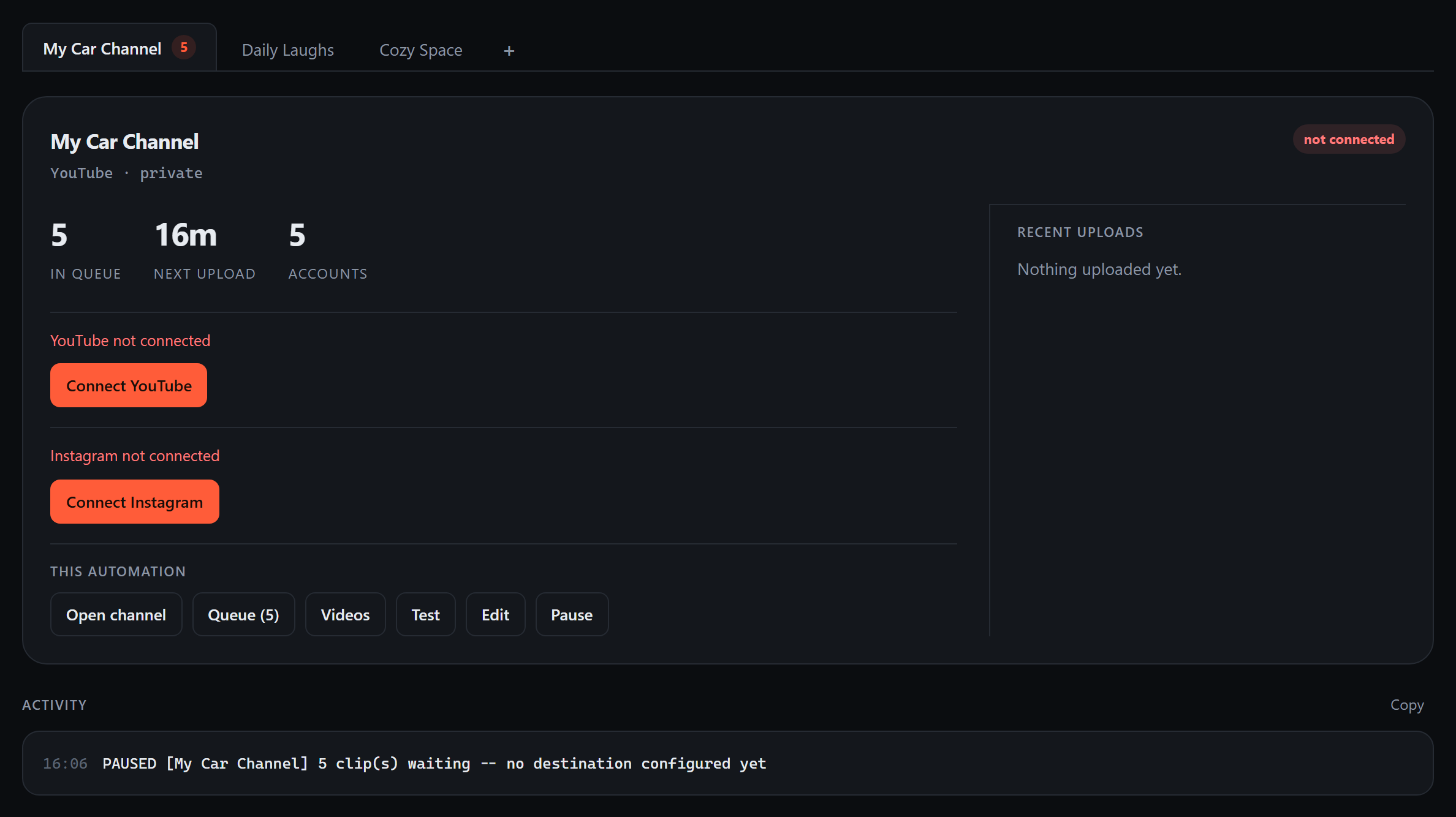
Channels sit along a tab strip, so ten of them cost no more scrolling than one. The open card shows queue depth, time until the next upload, how many accounts route here, and what went out recently. Connection status is colour-coded so a problem is obvious at a glance — green ready, yellow waiting, red blocked, blue uploading.
Test checks the destination without uploading, Pause holds one channel while the others carry on, and the activity log has a copy button for when something needs explaining.
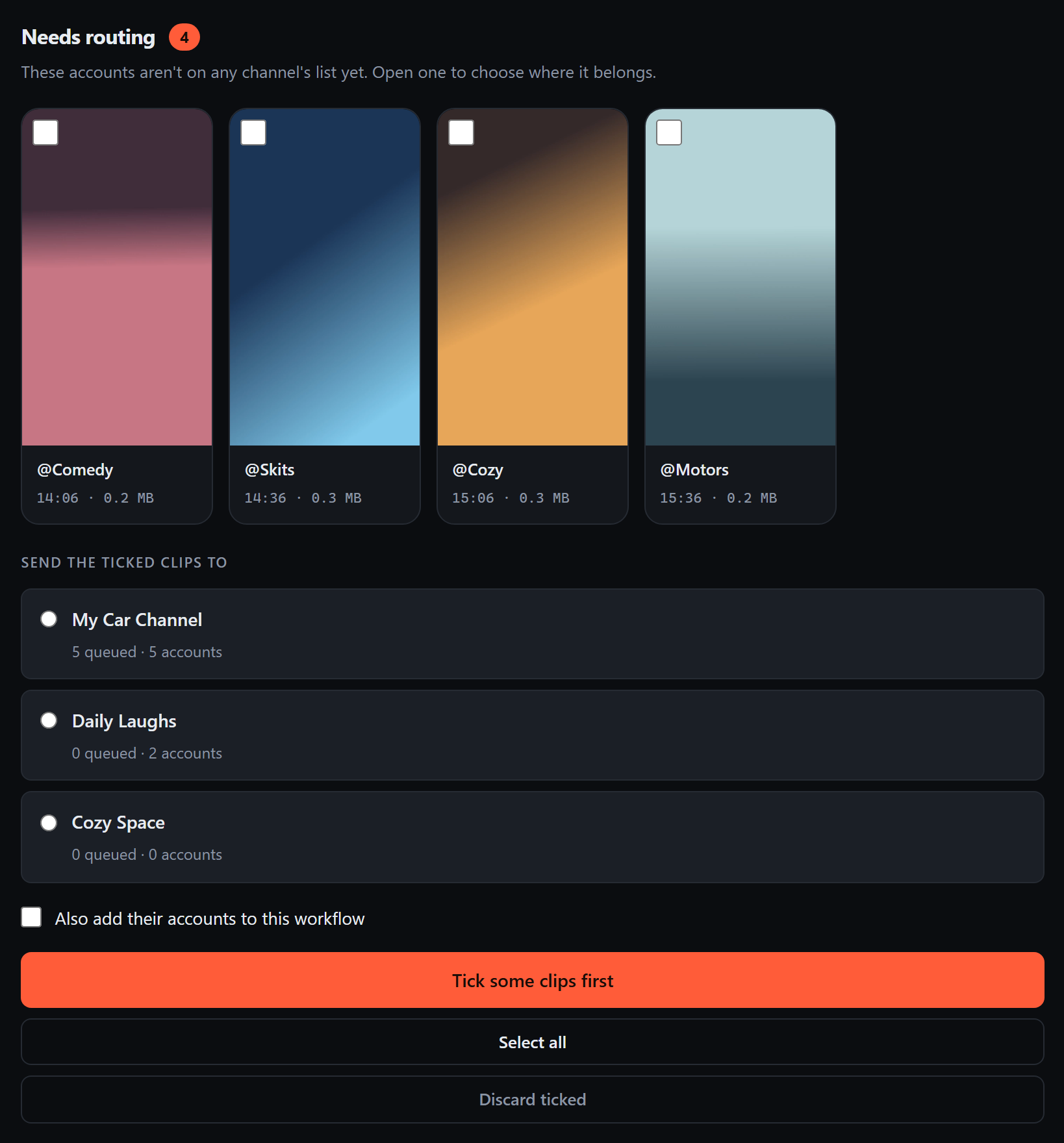
When a clip arrives from an account no channel claims, the app doesn't guess and doesn't discard it. The clip is downloaded and shown to you with a channel list. OK sends it just this once; Add to channel also saves the account, so the same creator routes itself from then on.
Anything you skip collects in Needs routing instead of nagging. Come back to a week's worth, tick the ones that belong together, and send them all to a channel at once — adding their accounts as you go, if you want. Clips you've already dealt with say so, and name the channel they went to.
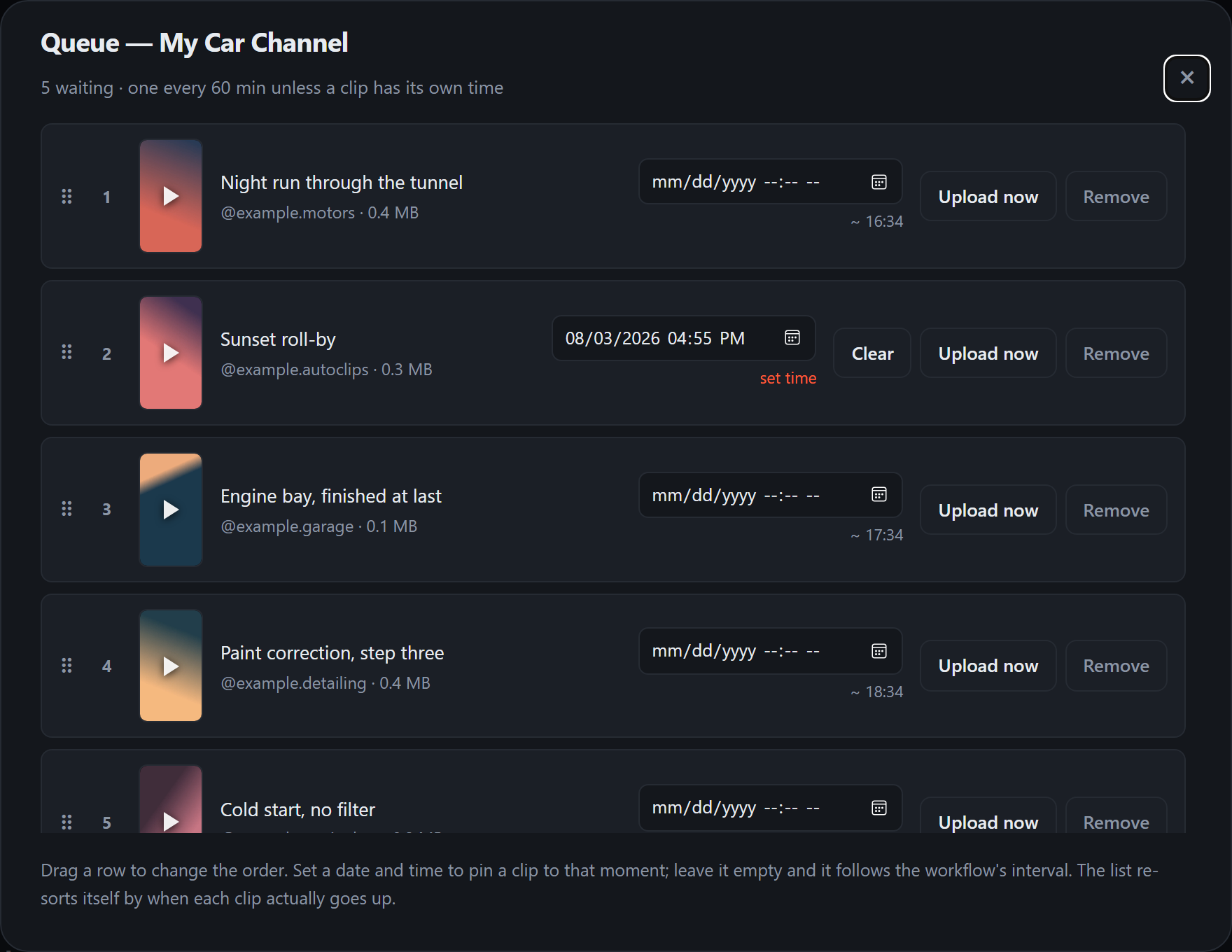
The queue is a list you can rearrange, not a black box. Drag a clip to move it, or give one a date and time of its own — the list re-sorts by when each clip actually goes up, so a pinned clip shows exactly where it lands.
Upload now jumps the line once. Clear drops a pinned clip back onto the channel's interval. Removing one asks first, and says plainly that the file itself is still there.
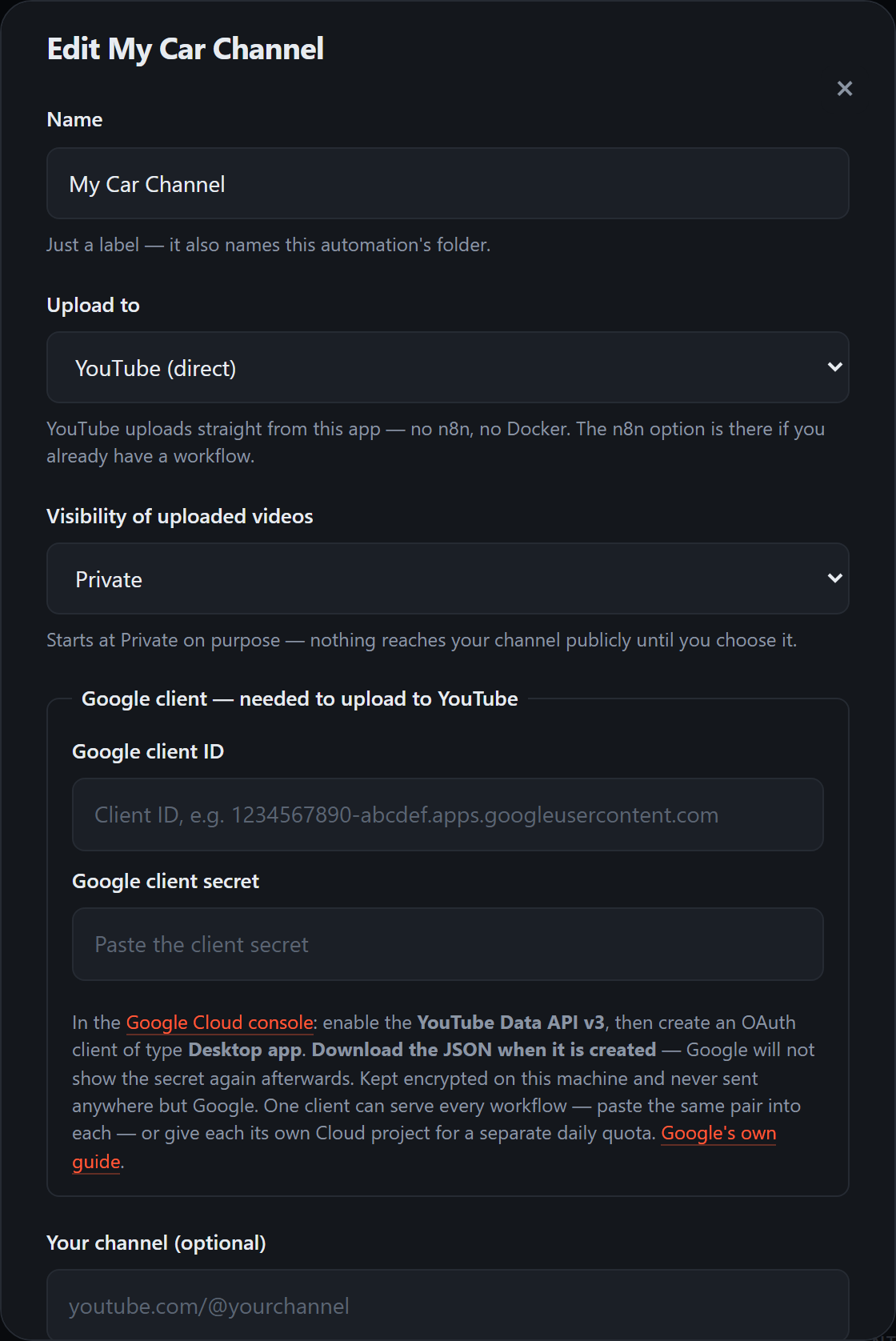
Destination, visibility, title behaviour, credit, description, category, tags, licence, upload options and the accounts that route here — all per channel, all in one form. Uploads start at Private deliberately: nothing reaches your audience until you choose it.
Its own Google client lives here too, not in a shared settings screen. One channel's credentials are one channel's business, and deleting a channel takes its credentials with it.
The Instagram accounts that feed it and the gap between its uploads sit in the same form — fifteen minutes to a day, whatever suits that channel.
Install
No account, no sign-up, no administrator rights needed.
ShortsPilot-Setup.exeIt installs for your user only, so there is no administrator prompt. You can add a desktop shortcut and choose whether it starts with Windows — both optional, both changeable later.
Windows will warn that the publisher is unknown. That is what an unsigned installer looks like; silencing it requires a paid code-signing certificate. Choose More info → Run anyway.
yt-dlp fetches from Instagram and ffmpeg
renders photo-and-music posts into vertical video. The app checks for
both at startup and tells you if either is missing.
:: one line each, once
winget install yt-dlp.yt-dlp
winget install Gyan.FFmpeg
From the Start menu, your desktop shortcut, or automatically at sign-in if you chose that. On first run it walks you through creating your first channel.
Run a newer installer over the top — your channels, connected accounts and queued clips are left alone. Nothing needs uninstalling first.
Uninstalling removes the application but deliberately leaves your data behind. Removing an app is not consent to delete your videos.
First run
Roughly ten minutes, most of it inside Google's console. You only do this once.
YouTube's API needs one, and it belongs to you rather than to this app. In the Google Cloud console: create a project, enable YouTube Data API v3, then create an OAuth client of type Desktop app. Google's own guide is Registering an application.
Paste the client ID and secret into the channel's own Edit form. Each channel holds its own client and its own tokens — nothing is shared behind your back, and Remove this Google client clears that one channel without touching the others.
Give it a name, leave the destination on YouTube (direct), and leave the Instagram accounts box empty — routing will build that list for you as clips arrive.
The same form carries everything YouTube will be told about each upload: category, tags, licence, whether subscribers are notified, whether embedding is allowed, and the made-for-kids flag. Set them once and every video from that channel inherits them.
Leave visibility on Private until you have watched one upload land correctly. Undoing a public upload is more annoying than the reverse. Unlisted sits in between if you want the link without the audience.
A login window opens inside the app. You sign in on Instagram's own page — the app never sees your password, only the session Instagram hands back, which it encrypts immediately.
This one opens your real browser, because Google refuses OAuth inside embedded windows. Approve the channel, then come back — leave the app running, since the approval is sent back to it.
That's it. Press Test first if you want confirmation the channel is ready. An idle channel uploads immediately, so the first clip shouldn't keep you waiting — watch the activity feed as it goes.
YouTube's API charges 1600 units per upload against a default of 10,000 per day — about six uploads a day, per Google Cloud project.
Because the Google client is set per channel, that ceiling is yours to arrange. Paste the same client into every channel and they share one allowance; give a channel its own Cloud project and it gets its own six.
This is a limit of the API, not of this app, and it applies equally to any tool that uploads programmatically. Beyond it you need a quota increase from Google, which is an audited process. Worth knowing before you plan a schedule around it.
Everything the app keeps — queued clips, uploaded history, connected accounts and settings — stays on your own machine. Credentials are encrypted and tied to your Windows account.
Nothing is sent anywhere except Instagram and YouTube, and only on your behalf. There is no sign-up, no telemetry and no server behind this app.
About
Routing, pacing, direct YouTube upload, encrypted credentials, two languages and a tray that lets you close the window without stopping the work — plus the things 1.0 taught me it needed: a queue you can reorder and schedule, bulk routing for a backlog, and the full set of YouTube upload options per channel.
Creator & developer
Shorts Pilot started as two Python scripts watching two folders, feeding an n8n workflow that uploaded to two YouTube channels. It worked, but it only worked for one person on one machine — every setting was a constant in a source file, and adding a channel meant editing code.
This is the rebuild: an application where a channel is something you create rather than something you code, where credentials are encrypted rather than pasted, and where the automation engine no longer needs Docker or a workflow tool to put a video on YouTube.
For reviewers
Shorts Pilot isn't open source — but if you're evaluating how I work, the code and its full commit history are available on request.
The comments are the part worth reading. They record what broke, what was measured, and why decisions went the way they did — including the ones that were wrong first time.
Message me and I'll give you a code. Each one is issued to a single person and stops working the moment it's used, so a code that leaks later is already spent.
Licence
Shorts Pilot is proprietary software, licensed rather than sold. The full terms are shown during installation and kept alongside the app.
You may install and use it on machines you own, to run your own channels — including channels that earn you money.
A commercial licence is required to use it on behalf of a company, agency or client, to offer it as a service to others, or to redistribute, resell or bundle it in any form.
© 2026 S.R (Aeolian). All rights reserved. Instagram and YouTube are trademarks of their respective owners; this software is not affiliated with, endorsed by or sponsored by either. You are responsible for holding the rights to anything you download or publish, and for complying with the terms of the platforms you connect.